
Browsers
For best performance, Canvas should be used on the current version of Chrome, Canvas runs on Windows, Mac, Linux, iOS, Android, or any other device with a modern web browser. Have at least two browsers installed on your computer so if you run into an issue with one, you can easily switch to the other (District recommends Edge as a secondary Browser). (That often resolves the issue.) Remember to keep your browsers updated.
If you are using a Chromebook please check it is updated to the latest version
Accessing Canvas
The most successful way to log in is via your email in Chrome (Chrome is a free download):
- Log onto your school email account (be sure all other accounts are logged out) example of school gmail - joe.test@ecacs16.ab.ca
- Click on the Google App switcher located in the upper right of your email screen (3x3 dots) Waffle
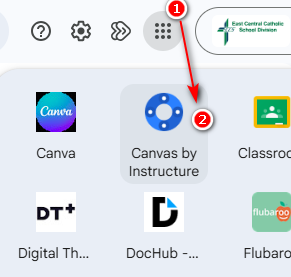
- Scroll down to find the Canvas by Instructure--it's usually on about section 3
- You should see all of your courses on your Canvas Dashboard
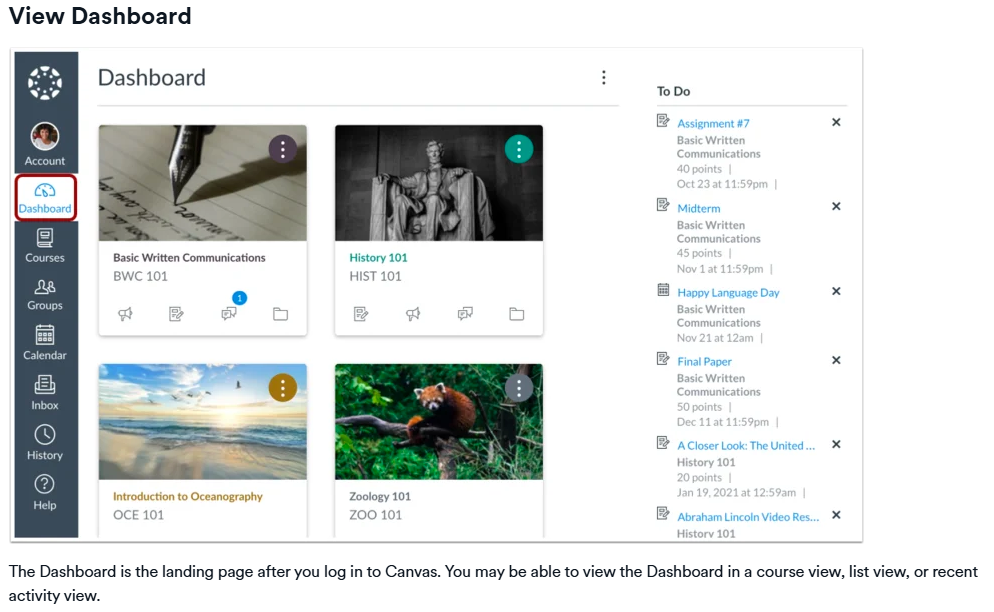
- Once you click a course on the Dashboard you will then see you Home Page of the course.
- Teacher contact info
- Course Modules, Assignments & Quizzes